Explore beyond the visible.
See what real sensors reveal. Understand the science. Create something of your own.
Look through the dust
Slide toward the infrared view. Look inside the dark pillars and in the space around them.
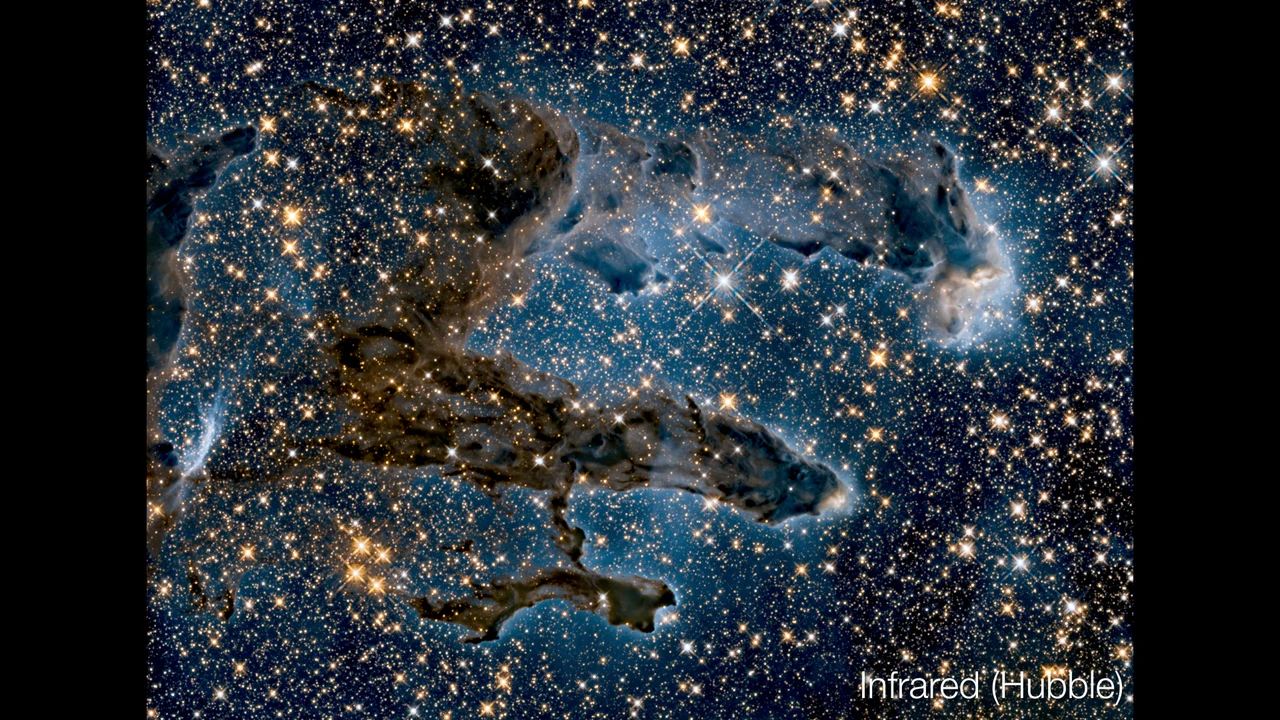
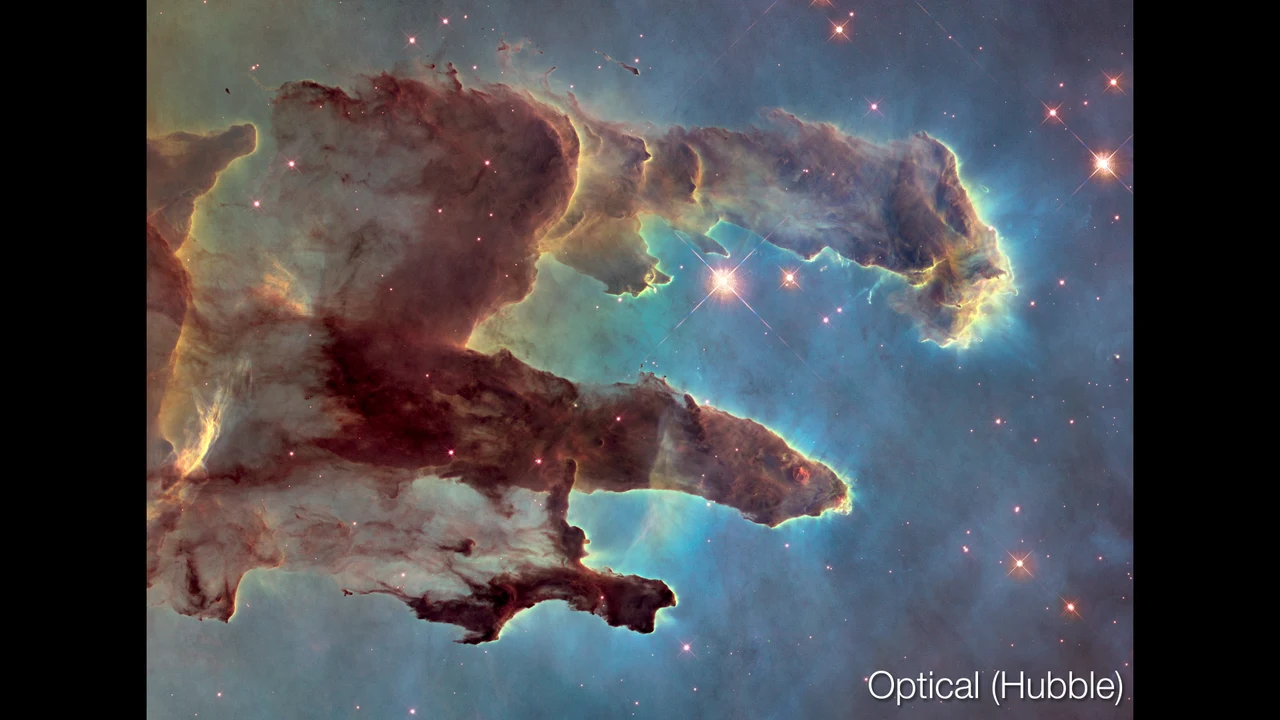
NASA, ESA, and the Hubble Heritage Team (STScI/AURA). Source and full observation details ↗
Your image, interpreted.
Photo effects use RGB colors and editable guesses. They do not reveal hidden wavelengths.
Compare with a real capture
Have a matching infrared, thermal, UV, or other sensor image? Load it beside your photo to judge the simulation. Both images must already show the same scene, pose, and crop. Reference authenticity is supplied by you.
The app resizes your reference to the photo dimensions. It does not align images automatically, read radiometric temperature data, or convert RGB values to physical measurements. Files stay in your browser.
Favorite settings 0 / 20
Save effects, opacity, split position, and playback speed. Apply them to any photo. Images are never stored with a favorite.
No favorites yet. Adjust an effect and save your first look.
Explore infrared, ultraviolet, and more through photo effects
Spectrum is a free visual light lab. Explore three real telescope comparisons, try three guided experiments, or create photo effects. In the photo studio, start with one of six photographs—landscape, cityscape, portrait, animal, flowers, or coast—or upload your own JPG, PNG, or WebP image.
Try 14 simulated bands: radio, microwave, thermal infrared, near infrared, red, orange, yellow, green, cyan, blue, violet, ultraviolet, X-ray, and gamma ray. Adjust opacity and effect strength, mix two bands, and compare the result with the original using a movable split divider.
How do the new models work?
Visible colors use RGB Multiply filters. Monochrome removes saturation after filtering, without automatically brightening the result. NIR, UV, and thermal use qualitative material properties. X-ray transmission uses NIST coefficients for water, polyethylene, and iron; other materials use proxies. Color hints are guesses, not AI recognition. Correct them with material stamps. Radio and gamma maps use a hypothetical source you place.
NIST: X-ray attenuation · FLIR: emissivity · CIE color approximation research
Are these real infrared or ultraviolet images?
The Explore real images library contains real telescope observations, with sources and display-color explanations. Uploaded photo effects are simulations: the studio combines a photo with editable assumptions about materials, temperature, thickness, and source placement. Modeled rendering uses simplified forward models; Classic keeps the original non-visible artistic effects. It cannot measure temperature, invisible radiation, UV fluorescence, internal structures, or radio emissions. Real spectral measurements require specialized sensors and data.
How can I inspect and compare my image?
Scroll over the image to zoom from 1× to 5×, then drag to pan. Both sides of a split comparison stay aligned. Turn on the pixel inspector to compare original and processed RGB values, or play an automatic sweep through the bands and pause on a look you like.
Can I save my results?
Download a PNG of the processed image or split comparison, or export a looping animated GIF of the spectrum. PNG images use the app’s processed resolution of up to 1,600 pixels along the longer edge. GIF animations use a 480-pixel image and a limited color palette. Favorite settings stay in this browser on this device.
Are uploaded photos sent to a server?
No. Your image is processed locally in your browser. Uploads are not sent to a server or saved with favorite settings, and reloading clears the uploaded image. Downloads are saved only when you choose to export them.